
I’ve worked with a lot of accounting firms over the years, and there’s a pattern I see almost every time I start a new engagement. Somewhere in that firm, there’s a senior accountant or a partner who spends a chunk of every week rebuilding the same report by hand. Not because the firm can’t afford better tools. Because nobody has sat down and actually mapped out which of their recurring reports are worth automating, and which ones aren’t.
That distinction matters more than people think. Not every report needs automation. But the ones that do, the ones you or your staff touch every week or every month without fail, are usually costing you far more time than anyone realizes until you actually add it up.
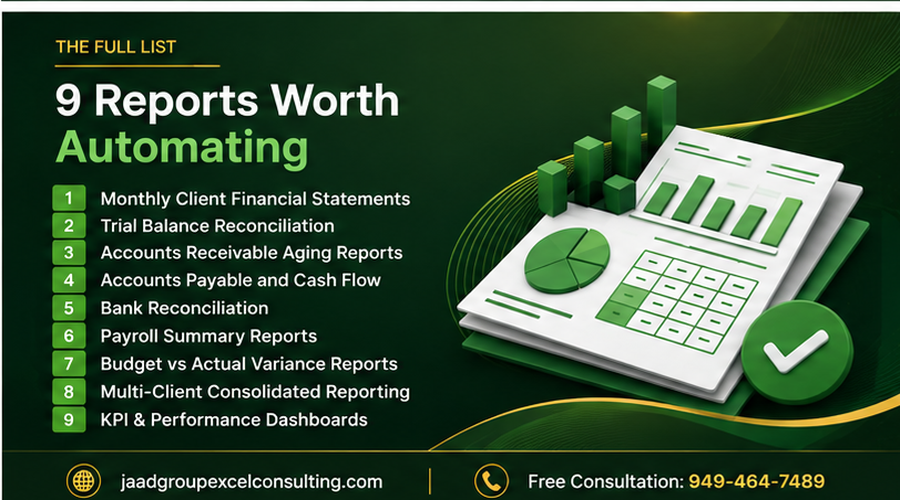
This article walks through the reports I see accounting firms automate most often, why each one is a good candidate, and what actually goes into automating it properly. I’m not going to tell you every report can be automated with a simple macro, because that’s not true. Some of what accounting firms deal with is genuinely messy, and I’ll get into that too.
Why Accounting Firms Specifically Benefit From Automation
Accounting work is repetitive in a very specific way. The same report structure gets rebuilt every month, every quarter, or every year, with new numbers dropped in. The logic almost never changes. Only the data does.
That’s exactly the kind of work Excel automation is built for. When the structure of a task stays the same and only the inputs change, you’re not looking at a one-off project, you’re looking at something that should run itself after the first proper setup.
There’s also the accuracy factor, which matters more in accounting than almost anywhere else. Manual data entry and copy-pasting between spreadsheets is where errors creep in, a misplaced decimal, a formula that didn’t update, a row that got skipped when data was pasted in. In accounting, those errors aren’t just embarrassing, they can affect client trust, compliance, and in some cases, real financial consequences. Automated processes, built correctly, remove that risk because the same steps run identically every single time.
And then there’s the seasonal pressure. Accounting firms deal with predictable crunch periods, month-end close, quarter-end, tax season. During those windows, staff time is the scarcest resource in the building. Every hour saved on report assembly during those periods is an hour that can go toward actual analysis, client conversations, or simply not burning out your team.
Report 1: Monthly Client Financial Statements
This is usually the first thing I automate for accounting firms, because it’s the report that eats the most recurring time.
Every month, for every client, someone pulls transaction data, formats a profit and loss statement, formats a balance sheet, checks that both actually tie out, and packages it into something presentable for the client. If a firm handles 30 or 40 clients, that’s 30 or 40 versions of essentially the same process, repeated every single month.
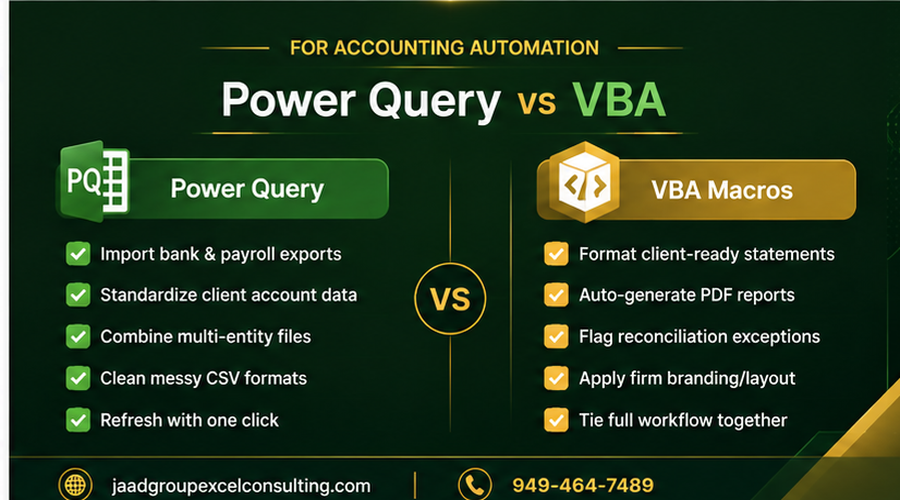
What makes this a strong automation candidate is that the report structure is identical across clients even when the underlying numbers are completely different. That consistency is exactly what VBA and Power Query are good at. I typically set this up so that raw transaction data gets pulled into a structured Excel Table, Power Query handles the standardization (correcting inconsistent account naming, mapping accounts to the right statement categories, filtering out non-relevant entries), and a VBA macro generates the formatted statement, applies the firm’s branding and layout, and saves it as a client-ready PDF with the correct naming convention.
Once this is built, producing 40 client statements can go from multiple days of work down to an afternoon of review, because the actual assembly work has already happened automatically.
Report 2: Trial Balance Reconciliation
Trial balance work is one of those tasks that looks simple until you’re the one doing it every month across dozens of accounts, checking that debits equal credits, flagging any account that’s out of balance, and tracking down the source of discrepancies.
The manual version of this involves scanning through rows of numbers, often across multiple tabs or multiple source files, looking for anything that doesn’t reconcile. It’s tedious, and tedious work is exactly where mistakes happen, because attention naturally drifts after the fifteenth account you’ve checked.
Automating this usually means building a macro that pulls the trial balance data, automatically flags any account where debits and credits don’t match within an acceptable threshold, highlights those rows, and generates a summary of exceptions that need human review. The point isn’t to remove the accountant from the process, it’s to make sure the accountant’s time goes toward investigating actual discrepancies instead of scanning for them manually.
Report 3: Accounts Receivable Aging Reports
AR aging reports are a great automation candidate because they follow the exact same logic every single time they’re generated, categorize outstanding invoices into age buckets (current, 30 days, 60 days, 90-plus), calculate totals for each bucket, and often flag accounts that need collection follow-up. For firms that want a refresher on how these reports are typically structured, FreshBooks has a solid breakdown of the standard AR aging report format.
I’ve built these for firms where the AR data comes from three or four different client accounting systems, each exporting data in a slightly different format. That’s where this gets more involved than a basic macro. The automation needs to standardize each source format first, usually through Power Query, before the aging calculation logic can run consistently across all of them.
Once it’s set up, a report that used to take an hour or two per client, especially for clients with hundreds of open invoices, can be regenerated in seconds with fresh data, formatted the same way every time, ready to hand off or review.
Report 4: Accounts Payable and Cash Flow Reports
On the flip side of AR, accounts payable reporting benefits from the same kind of automation, tracking what’s owed, when it’s due, and rolling that into a short-term cash flow projection.
This is one where I usually build in a forecasting layer beyond just the current AP balance. A macro pulls upcoming payment obligations, cross-references them against expected incoming receivables from the AR side, and generates a rolling cash position projection for the next 30, 60, or 90 days. For firms doing advisory work alongside compliance work, this kind of automated cash flow visibility becomes a genuinely valuable client deliverable, not just an internal housekeeping report.
Report 5: Bank Reconciliation
Bank reconciliation is one of the most universally hated recurring tasks in accounting, and it’s also one of the best automation candidates, because the logic is entirely rules-based. Match transactions between the bank statement and the general ledger, flag anything that doesn’t have a match, and summarize the outstanding items. NetSuite has a thorough guide to how bank reconciliation is typically performed.
The challenge with automating bank rec isn’t the matching logic itself, it’s that bank statement exports are notoriously inconsistent between institutions. One bank’s CSV export lays out transaction descriptions completely differently than another’s. This is exactly the kind of “messy exported data” problem I’ve written about before, where the automation has to account for a pattern in the data rather than assuming a clean, predictable structure.
Once built correctly, though, a reconciliation that took two or three hours per account per month can run in minutes, with a clear exception list showing exactly what still needs manual review, instead of forcing someone to check every single line.
Report 6: Payroll Summary Reports
For firms handling payroll processing or payroll review for clients, generating summary reports, gross wages, tax withholdings, benefit deductions, employer contributions, broken out by department or employee, is another highly repetitive process with a fixed structure and changing data.
I automate this by pulling payroll data through Power Query, standardizing it against the firm’s reporting template, and using VBA to generate the final formatted summary, along with any required breakdowns by department, location, or pay period. For firms managing payroll across multiple clients with different pay schedules, this kind of automation removes a significant amount of the manual reformatting that eats up processing time every pay cycle.
Report 7: Budget vs Actual Variance Reports
Variance reporting compares actual performance against budgeted figures and highlights where the differences are significant enough to flag. It’s valuable to clients, and it’s also one of the more formula-heavy reports on this list, which makes it a strong candidate for automation once the underlying logic is defined.
The setup usually involves pulling actual financial data alongside the client’s budget figures, calculating variance in both dollar and percentage terms, and using conditional formatting or VBA-driven highlighting to flag variances beyond a set threshold. The valuable part isn’t just the calculation, it’s making sure the report highlights what actually matters instead of burying meaningful variances in a wall of numbers.
Report 8: Multi-Client Consolidated Reporting
This one is specific to firms that manage multiple entities under one parent client, franchise groups, multi-location businesses, or portfolio companies under one ownership structure. Consolidating financials across multiple entities into a single combined report is time-consuming to do manually, and it’s also where I see the most inconsistency errors, because each entity’s books rarely follow the exact same account structure.
Automating this requires building a standardized chart of accounts mapping first, so that each entity’s data gets translated into a common structure before consolidation happens. Once that mapping exists, VBA can pull each entity’s data, apply the mapping, and generate the consolidated statement automatically. This is a more involved build than most of the reports on this list, but for firms handling multi-entity clients regularly, it’s often the single highest-value automation project available.
Report 9: Client Billing and Time Tracking Summaries
Less client-facing, but just as time-consuming internally, is the reporting firms do on their own billing and staff time allocation. Pulling time entries, mapping them to client engagements, calculating billable versus non-billable hours, and generating utilization reports by staff member is a recurring internal task that’s almost always done manually, often in a spreadsheet that gets rebuilt from scratch every reporting period.
Automating this internally frees up the same kind of time as the client-facing reports, and it also tends to surface useful patterns, which staff members are consistently over or under-utilized, which engagements are running over budgeted hours, that firms often don’t have visibility into when this reporting is done manually and inconsistently.
What Makes These Reports Good (or Bad) Automation Candidates
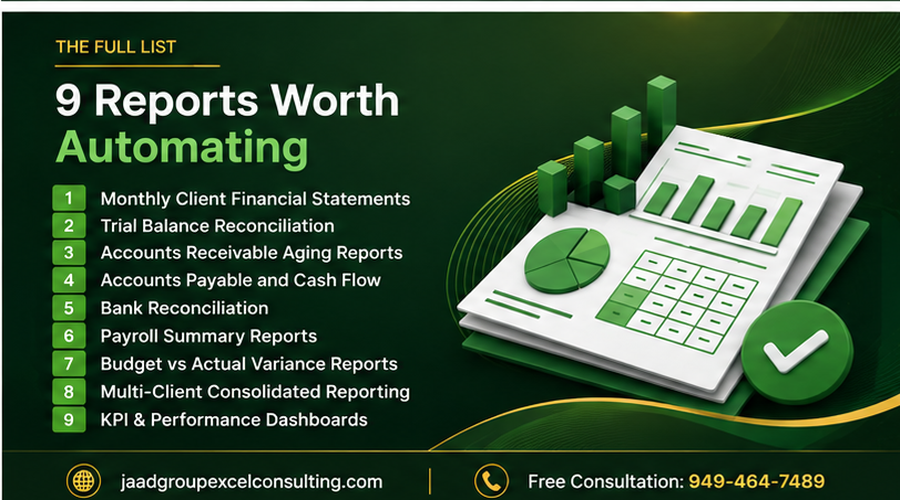
Not everything an accounting firm produces is worth automating, and it’s worth being honest about that. The reports above share a few common traits that make them strong candidates.
They run on a fixed schedule, weekly, monthly, or quarterly, so the time savings compound. The underlying logic doesn’t change even though the data does. And they involve enough volume, multiple clients, multiple accounts, multiple entities, that manual repetition is genuinely costly.
A one-off report you build for a single client presentation once a year usually isn’t worth automating. The setup time wouldn’t pay for itself. The reports worth automating are the ones eating into your team’s time every single reporting cycle, indefinitely.
The Mistake I See Accounting Firms Make Most Often
Firms often try to automate a report before fixing the underlying data problems feeding into it. If your source data, whether that’s a bank export, a client’s accounting software export, or an internal system, is inconsistent or poorly structured, building automation on top of it just automates the inconsistency faster.
I always start by looking at the actual source data before building anything. If it’s clean and structured, we can move straight to building the report logic. If it’s scattered or inconsistent, which happens constantly with data pulled from different client systems, that gets addressed first, otherwise the automation breaks the first time the format shifts even slightly.
The other common mistake is building something only one person understands. If a macro breaks and only the person who originally built it can fix it, you haven’t actually reduced your firm’s risk, you’ve just moved it somewhere less visible. Every automation project I build for a firm comes with documentation so more than one person on the team can run and maintain it.
When to Build This In-House vs Bring in Help
If your firm has someone comfortable with Power Query and basic VBA, and your reports are relatively standardized, a lot of what’s described here is achievable in-house with some dedicated time.
Where it makes sense to bring in outside help is when the data sources are inconsistent across clients, when previous automation attempts have broken repeatedly, when the reports involve enough complexity that errors carry real consequences, or when your team simply doesn’t have the bandwidth to build and properly test this kind of system during an already busy season.
At JAAD Group, this is exactly the kind of work I specialize in. I’ve built these systems for accounting firms handling everything from single-entity monthly statements to multi-client consolidated reporting across inconsistent data sources. Every project starts with actually looking at your current reports and your data, not assuming a one-size-fits-all template will work, and every system I hand over comes with documentation so your team can run it confidently.
If your firm is rebuilding the same reports by hand every month or every quarter, that’s usually a sign there’s real time to be recovered.
Call JAAD Group: 949-464-7489 Visit: jaadgroupexcelconsulting.com