
I get asked this question in almost every first call I take, and usually not in these exact words. It’s more like, “So what would you actually do for us?” People have a vague sense that I show up, look at their spreadsheets, and somehow make the tedious parts disappear. That’s not wrong exactly, but it skips over almost everything that actually matters about the job.
I can tell you the honest answer has less to do with tools and more to do with a specific way of looking at how a business actually runs day to day, versus how everyone assumes it runs. This article is my attempt to explain the work the way it actually happens, including the parts that aren’t glamorous and the parts that take longer than people expect.
The Short Answer
An automation consultant looks at the repetitive, manual work happening inside a business, figures out which parts of it can be reliably handled by software instead of a person, and builds that solution in a way that actually holds up over time. That’s the one-sentence version, and almost every word in it is doing real work. The rest of this article is mostly unpacking what each piece actually means once you’re in the middle of a real project.
The job isn’t “knows how to use Power Automate” or “is good at VBA.” Those are tools. I use both, along with Power Query, Zapier, and occasionally Python, depending on the problem. The actual skill is diagnosing what’s happening inside a business clearly enough to know which tool, if any, actually fixes it.
It Starts With Listening, Not With Tools
Here’s something that might surprise people. The first meeting with a new client almost never involves me opening Excel or talking about VBA or Power Automate at all. It’s mostly me asking questions and taking notes.

I want to know what the process looks like right now, step by step, in as much detail as the person can give me. Who does it. How often. What they start with, what file, what system, what email, what report. What comes out the other end. Where the actual pain is, because sometimes the thing someone assumes is the problem isn’t the real bottleneck once you look closely.
I also ask about history. Has anyone tried to fix this before? What happened? A lot of the time, someone already attempted a macro or a basic automation, and it broke, or it never quite worked the way they wanted, or it worked for the one person who built it and nobody else could touch it. That history tells me a lot about what to watch for the second time around.
This part of the job looks less like technical work and more like being a good interviewer. If I can’t explain the actual process back to the client accurately, I’m not ready to start building anything, no matter how eager I am to get into the code.
Deciding Whether Automation Is Even the Right Fix
This is a step a lot of people skip, both consultants and clients, and I take it seriously. Not every slow, annoying process should be automated. Sometimes the process itself is the problem, and automating a broken process just makes it fail faster and more consistently.
If a report takes a long time because the underlying data is scattered across five systems that don’t talk to each other, sometimes the real fix is consolidating those systems, or standardizing how data gets entered in the first place, before any automation gets layered on top. I’ve told clients before that what they actually need isn’t a macro, it’s a conversation with whoever owns their data entry process, because no amount of clever code fixes data that’s fundamentally inconsistent at the source.
I also weigh frequency and volume before recommending anything. A report that takes fifteen minutes and happens twice a year almost never justifies the cost of building real automation around it. A report that takes three hours and happens every week is a completely different conversation. Part of doing this job honestly is being upfront about that math, even when it means telling someone they don’t actually need to hire me for a particular task.
The Actual Work: What I Do On Every Project
Once I’ve decided automation makes sense, the project moves through a consistent sequence. The specifics change from client to client, but this structure holds regardless of industry or which tool ends up being used.
Mapping the Real Process, Not the Assumed One
I document exactly what happens right now, in detail, without skipping steps that feel “obvious” to the person doing them every day.
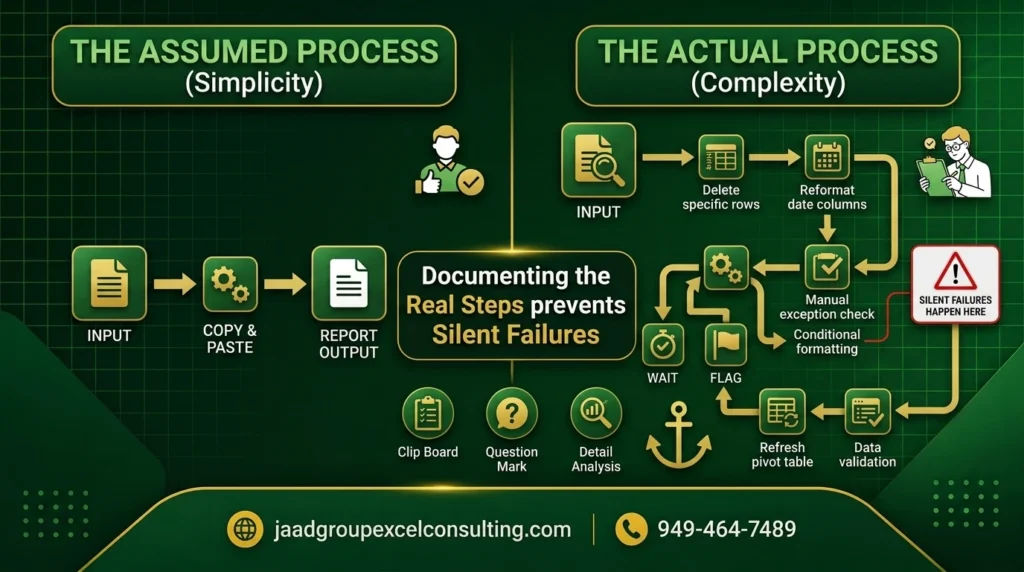
This matters more than people expect, because someone who does a task manually every week has usually internalized a dozen small decisions they make without thinking about them. They’ll tell me “I just copy the data over,” and then when I actually watch them do it, I see them also deleting three specific rows, reformatting a date column, and manually checking one particular account for an error that happens occasionally. None of that came up when they described the process out loud, because to them, it’s not a separate step. It’s just part of “copying the data over.”
Missing these details is exactly how automation projects fail. If I build something based on the simplified version of a process, and it doesn’t account for the manual exception-handling someone was doing without realizing it, the automation will produce wrong results the first time that exception shows up. So I spend real time watching the process happen, not just hearing about it secondhand.
Deciding What’s Actually Worth Automating
Even within a single client engagement, not everything on the table deserves the same priority. I rank candidates by a simple, honest calculation: how much time does this actually cost per cycle, how often does it repeat, and what happens if it goes wrong. A daily task that saves fifteen minutes can outrank a once-a-quarter task that saves two hours, because the daily task compounds. Rare, judgment-heavy tasks generally stay manual, because forcing automation onto something that needs human discretion usually costs more than it saves.
Choosing the Right Tool for the Actual Problem
This is the part people assume comes first, and it’s usually step three or four in my actual process. Once I understand the real workflow and the real data, the tool choice usually becomes fairly obvious, because different tools are genuinely good at different things.
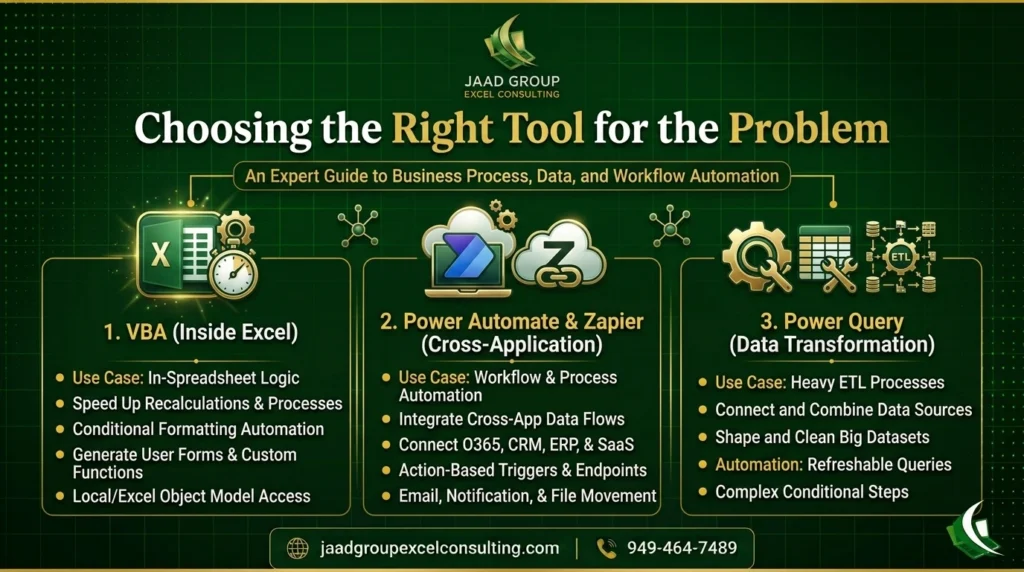
If the process lives entirely inside Excel, formatting, calculations, generating a report from data already in the workbook, VBA is usually the right call, especially when speed and offline reliability matter. If the workflow needs to move information between different applications, an email trigger that needs to update a CRM, a form submission that needs to create a task somewhere else, that’s Power Automate or Zapier territory, and which of those two depends heavily on whether the business runs mostly inside the Microsoft ecosystem or across a wider mix of tools. If the data transformation is heavy but doesn’t need to live inside Excel specifically, Power Query often handles it more cleanly than a custom macro would.
Sometimes the honest answer is that a project needs more than one of these working together. I build a lot of systems where VBA handles the in-Excel cleanup and formatting, and Power Automate or Zapier picks up the finished output and routes it somewhere else. Part of doing this job well is knowing these tools closely enough, from actual hands-on use, to combine them instead of forcing everything through whichever one happens to be most comfortable.
Handling the Data That Doesn’t Cooperate
This is the part of the job that I think separates people who can automate simple, well-behaved processes from people who can automate the messy, real-world stuff most businesses actually deal with, and it’s worth spending real time on because it comes up constantly.
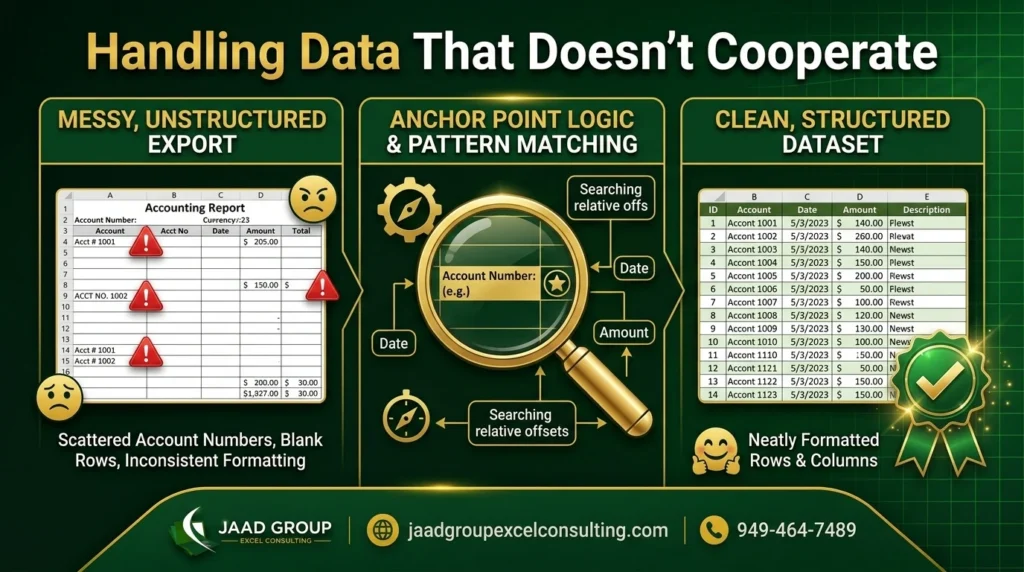
Real business data is rarely clean. Exports from accounting systems, CRMs, and legacy software often don’t arrive in a simple, structured table. I regularly see files where important information is scattered, an account number in a consistent column but only appearing every several rows, with other fields filling gaps in an irregular but repeatable pattern. There’s no clean CSV underneath that. But there is a pattern, and finding it takes actually sitting with the raw export and studying it before writing a single line of code.
This is where a lot of automation attempts fail, both DIY attempts and, frankly, some consultants who mostly work with drag-and-drop platforms. Off-the-shelf automation tools expect structured, predictable input. When the source data itself is irregular, those tools don’t have the flexibility to reason through row-by-row inconsistencies. That takes custom code, written by someone who’s identified the underlying logic rather than assuming every export looks the same.
I build this kind of solution by finding what I think of as an anchor point in the data, something reliable that consistently marks where a new record begins, then writing logic that searches for that anchor and pulls the surrounding information relative to it, instead of assuming every row follows a fixed layout. It’s slower to build than a simple row-by-row macro, but it’s the only approach that actually holds up against real, inconsistent exports.
Building in Validation, Not Just the Happy Path
A mistake I see constantly, in both amateur automation and some professional work, is building something that only works correctly when everything goes exactly as expected. What happens when a required field is empty? What happens when the source file’s format shifts slightly because a vendor changed their export template? What happens when a value shows up that doesn’t match the pattern the automation was built around?
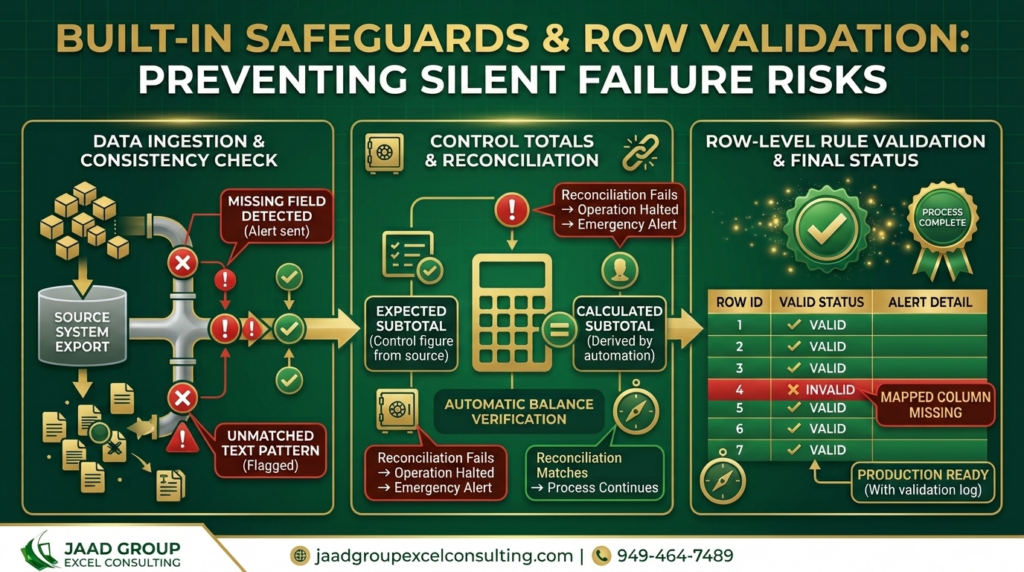 A good automation doesn’t just handle the expected case. It’s built to recognize when something doesn’t match what it expects, and to flag that clearly instead of either crashing unhelpfully or, worse, silently producing an incorrect result that nobody notices until much later. I build validation directly into almost everything I create, a check that says, in effect, “this row doesn’t match the expected pattern, here’s exactly where, go look at it,” rather than assuming the data will always behave.
Testing Against the Worst Example, Not the Cleanest One
When I’m building something, I don’t just test it against the sample data a client happened to hand me. I ask for edge cases specifically. What does a record with a missing field look like? Has this ever included a duplicate entry? What happened the one time the source system changed formats? What’s the messiest file you’ve ever gotten from this vendor?
Clients are often surprised I ask for their worst example instead of their cleanest one, but that’s the file that actually tells me whether what I’m building will hold up. Testing only against a clean, well-behaved sample is how automation looks great in a demo and then breaks the first time it meets real-world data three weeks later.
Documentation and Handoff
When I finish a project, I don’t just deliver a working file and disappear. I write documentation that explains what the automation does, how it’s structured, and what to check if something eventually breaks. I do this because I’ve seen the alternative go badly for clients more than once. A macro built by someone who never documented anything becomes a black box the moment that person is unavailable, whether they’ve left the company, gone on vacation, or simply moved on. If a business is entirely dependent on one person’s memory to understand how their own reporting works, that’s a real risk, and it’s one I try to actively remove rather than create.
Training the People Who’ll Actually Use It
Building something correctly is only half the job if nobody on the client’s team understands how to run it, adjust it, or trust it. I walk through the finished system directly with whoever will actually use it day to day, not just the person who commissioned the work. This usually isn’t a formal session with slides. It’s more like sitting down together, running the process a few times, and answering questions as they come up. People trust a system a lot more once they’ve run it themselves with someone available to explain what they’re seeing.
What a Typical Week Actually Looks Like for Me
People sometimes picture consulting work as constant meetings or constant coding, and it’s really a mix that shifts week to week depending on where different projects stand. Some days are almost entirely spent inside a client’s actual export files, studying patterns, sketching out logic on paper before I write any code, then building and testing. Other days are mostly conversations, a discovery call with a new client, a walkthrough with an existing client’s team, a follow-up on something that surfaced after a handoff. I usually have a handful of projects moving at different stages simultaneously: one in early discovery, one deep in the messy-data pattern-finding stage, one in testing, one already delivered and just needing occasional support.
Automation Consultant vs Engineer vs Developer vs Agency
The titles in this space blur together constantly, and it’s worth being precise about the actual differences, because they affect what you should expect from each.
An automation consultant owns the full outcome, mapping the process, designing the solution, building it, and handing it off documented, typically working directly with a business rather than inside an existing internal team. An automation engineer more often builds within someone else’s design, frequently as an in-house role at a larger company, executing a specification rather than creating it from scratch. A software developer writes custom applications from the ground up. A consultant, by contrast, writes the glue and logic connecting existing systems, reaching for custom code specifically when a project demands it rather than defaulting to it.
An automation consulting agency is essentially a team doing this same work at scale, with more people and more overhead, which can mean faster turnaround on larger projects but also more layers between you and whoever actually touches your data. A solo consultant, like me, means one experienced person handling the entire engagement personally, with fewer handoffs internally but a narrower bandwidth for handling multiple large projects simultaneously. Neither structure is inherently better. It depends on the size and complexity of what you’re automating.
One more distinction worth making clearly: industrial automation consultants work with factory floor equipment, PLCs, and machinery control systems, an entirely different discipline from business process automation. If you’re researching this field and keep running into forum discussions about programmable logic controllers, you’ve drifted into the industrial side. This article, and my own work, sits entirely on the business software side, Excel, VBA, Power Automate, and the workflows that run on top of a company’s existing data.
What This Actually Costs
I think a lot of businesses avoid reaching out because they assume automation consulting is priced like enterprise software consulting, with numbers that only make sense for large companies. That’s not been my experience running this kind of practice, and it’s worth being direct about the range.
Smaller, well-defined projects, automating a single report or a specific recurring process, typically fall in a range businesses can evaluate against the time they’re already losing, often paying for themselves within a few months once you calculate the hours saved. Larger engagements involving multiple interconnected reports, messy data from several inconsistent sources, or ongoing support, cost more, but scale with the actual complexity and value involved rather than following a flat enterprise rate card.
What I always recommend, regardless of who you’re talking to, is asking for a clear, fixed scope before committing to anything open-ended. If a consultant can’t tell you roughly what a defined project will cost before starting, that’s worth asking more questions about. I scope every engagement this way specifically so a client knows what they’re getting into before any work begins.
How to Judge an Automation Consultant
Having done this for 25 years, and having been brought in more than once to fix or replace something a previous consultant built, I think there are a handful of specific things that separate someone who’ll actually solve your problem from someone who’ll just build something that looks fine in a demo.
They ask real questions about your process before recommending any tool. If someone opens a first conversation with a pitch for their favorite platform before understanding what you actually need, that’s the order backward. They bring up edge cases without being prompted, what happens with missing data, what happens if a connection fails, what happens when the format shifts. They’re upfront about when automation isn’t actually the right fix for a particular problem, even when that means less work for them.
They put documentation and training into the actual scope of the project, priced and planned, not offered as an afterthought. And they can describe, specifically, a project that didn’t go the way they expected and what they changed afterward. Vague reassurance is a different answer than a specific story, and the difference tells you a lot.
Mistakes I’ve Watched Other Consultants Make
I’ve been brought in more than once to fix or replace something a previous consultant or agency built, and the patterns behind those failures are worth mentioning, because they’re a useful way to understand what good automation consulting actually requires.
The most common one is building for the demo instead of for production. Someone builds an impressive-looking automation using a clean sample dataset the client provided, everyone’s happy in the meeting, and then it quietly breaks the first time it meets the business’s actual, messier data three weeks later. This usually happens when a consultant asks for “a sample file” instead of specifically asking for the worst, messiest, most exception-riddled file the client has ever dealt with.
Another one is over-engineering a simple problem. I’ve seen consultants build elaborate, multi-platform automation stacks, three or four tools chained together, for a task that genuinely could have been handled with a single well-built macro. This usually happens when someone is more invested in showcasing a particular platform they specialize in than in solving the client’s actual problem efficiently. More moving parts means more places for something to eventually break, and more complexity for the client’s team to eventually maintain.
The opposite mistake happens too, under-engineering something that actually needed more robustness. I’ve inherited projects where a consultant built a quick macro that worked fine for months, right up until the client’s accounting software changed its export format slightly, and the whole thing silently started producing wrong numbers because there was no validation built in to catch it. Nobody noticed for weeks. That’s the kind of failure that erodes trust in automation generally, not just in that one project, because the client walks away assuming automation itself is unreliable, when really it was a specific implementation that skipped a step that mattered.
I’ve also seen consultants treat the handoff as an afterthought, delivering a working file with zero documentation and no walkthrough, then becoming essentially unreachable for support afterward. The client is left with something that works, until it doesn’t, and nobody on their team has any idea where to even start looking when it breaks.
How to Know If You Need One
A few honest signals I’d point to, based on the conversations I have most often. If a process takes real hours, more than an hour or two, and it repeats weekly or monthly without fail, the math usually favors automating it properly. If your team has already tried to build something and it kept breaking, that’s often a sign the underlying complexity is higher than a first attempt accounted for.
If your source data is scattered or inconsistent, rather than a clean, predictable table, that’s specifically the kind of problem that benefits from someone experienced rather than a generic, drag-and-drop tool. And if the report or process is important enough that a mistake carries real consequences, financially, legally, or in terms of client trust, that’s exactly when it’s worth having something built properly with validation, instead of relying on a fragile process held together by institutional memory.
On the other side, if a task takes twenty minutes a month and the data is already clean, the return on bringing in outside help is genuinely low. A lot of routine, well-structured reporting is reasonably handled in-house by a team member comfortable with basic Excel Tables and Power Query. Knowing which category your situation falls into is worth a short, honest conversation, rather than assuming either that you definitely need help or that you definitely don’t.
What Makes This Work at JAAD Group
At JAAD Group, this is how I approach every engagement, personally, not handed off to a junior team member partway through. I start by actually understanding your process and your data before recommending anything, I build with the messy, real-world version of your information in mind rather than assuming it will always be clean, and I hand over documentation so your own team can run and maintain what I build.
If you’re trying to figure out whether your business has something worth automating, or you’ve already tried and it hasn’t held up, that’s a conversation worth having.