
A business has been running its numbers through Excel for years, the workbook has grown messier as the company grew, and somewhere along the way someone floated the idea of switching to Python instead. The person asking rarely wants a debate about programming languages. They want to know if the tool they have built their whole operation on is suddenly the wrong one.
It is not, at least not automatically. Excel and Python solve different problems. One is a spreadsheet you work in directly. The other is a language someone writes instructions in, and a computer carries those instructions out without you watching the work happen. Neither one is simply the upgraded version of the other, and choosing a side before understanding what each tool actually does well is how businesses end up paying twice to fix the same problem.
What Each Tool Is Actually Built For
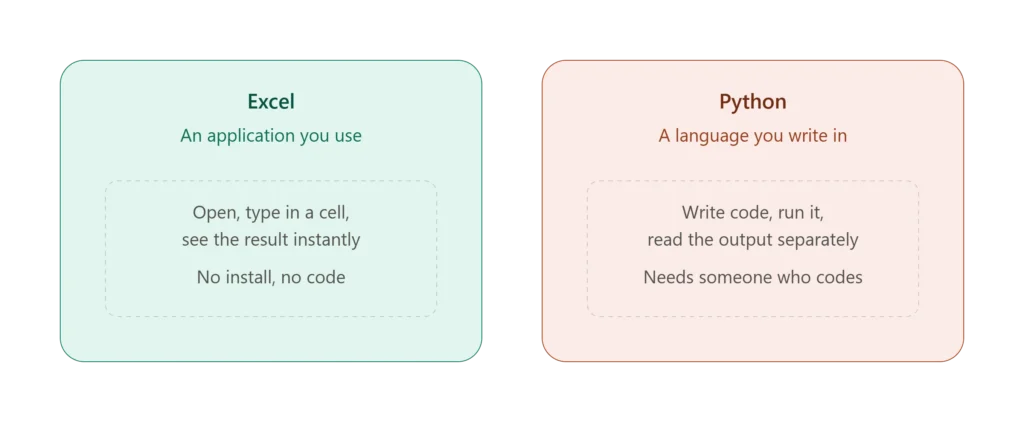
Excel is a spreadsheet application. You open a grid, you type numbers and formulas into cells, and you see the result immediately. No installation beyond Microsoft 365, no environment to configure, and the learning curve is close to zero for basic use. Everyone from an intern to a CFO can open the same file and understand what they are looking at.
Python is a general purpose programming language. It has no built in grid, no cells, and no visible interface until you build one or point it at a tool that renders output. What it does have is a library called pandas that is purpose built for working with tabular data, plus thousands of other libraries for everything from web scraping to machine learning. Nothing runs until someone writes the code that tells it what to do, and reading the result usually means running another piece of code or opening a chart the code generated.
The distinction that matters for a business owner is this. Excel is an application you use. Python is a language you or someone you hire has to write in. That single difference explains almost every other point in this article.
Where Excel Wins
Speed for one off work. If you need an answer today, Excel gets you there faster. Open the file, write a formula, look at the number. There is no environment to set up and no code to debug. For the ad hoc analysis that fills most business days, that speed matters more than raw processing power.
No specialized hiring required. Almost everyone in a business environment can read a spreadsheet and update a formula. Python requires someone who can write and maintain code, which usually means hiring a developer or a data analyst with programming skills, or paying a consultant every time something needs to change. That cost is easy to underestimate until the person who wrote the original script leaves the company.
Visual, editable output everyone can check. In Excel, the data and the logic sit in the same place. Anyone can click a cell, see the formula, and verify the number is right. In Python, the logic lives in a code file that most people in the business cannot read, and the output is usually a separate file or chart. Verifying a Python result often means trusting the person who wrote the script rather than checking the work yourself.
Financial modeling and formula depth. For the kind of financial modeling finance teams do daily, budget versus actual analysis, cash flow forecasts, scenario models, Excel remains the standard for a reason. The formula library is deep, the structure is flexible, and building a model is a matter of writing formulas, not writing and testing software.
Custom automation with VBA. Excel is not limited to formulas. VBA lets you automate formatting, file handling, and business specific processes without ever leaving the spreadsheet environment, and I cover the most common uses of that in my guide on how to automate Excel reports. For businesses that want automation without adding a programming language to their stack, VBA closes most of the gap that people assume only Python can fill.
Where Python Wins
Generating dozens of Excel files at once. This one surprises people. A business that needs a separate, formatted Excel report for each of sixty regional managers every quarter is usually looking at days of manual copy and paste work. A short Python script can pull the data, split it by region, format each file, and save all sixty in under a minute. Python is not just an alternative to Excel here, it is a way to produce Excel output at a volume no person could match by hand.
Messy, unstructured, or text heavy data. Excel is built around clean rows and columns. The moment your data is mostly free text, inconsistent formatting, or content that needs to be parsed and categorized rather than calculated, Excel starts to struggle. Python’s text processing libraries handle that kind of unstructured data far more reliably.
Large datasets that break Excel. Excel worksheets are capped at 1,048,576 rows, and performance starts dragging well before you hit that ceiling. Python and pandas handle millions of rows without the lag, the crashes, or the file size problems that come with pushing Excel past what it was built for.
Repeatable processes that run without a person clicking anything. A Python script can pull data from an API, clean it, run the same transformation every single time, and save the result, on a schedule, with zero human involvement. Excel can get partway there with VBA and Power Query, but a script running on a server on a cron job is a different level of hands off automation, especially when the process needs to touch systems outside Excel entirely.
Statistical and machine learning work. If the task is building a predictive model, running a real statistical test, or doing anything with machine learning libraries, Python is built for that and Excel is not. Libraries like scikit-learn and statsmodels exist because this kind of analysis needs tools a spreadsheet was never designed to provide.
Connecting to non standard data sources. Python connects to APIs, web pages, databases, and file formats that Excel either cannot reach directly or can only reach through a clunky add-in. If your data lives somewhere unusual or arrives in a format Excel struggles to import cleanly, Python is generally the more direct route in.
Version control and auditability at scale. Python code can live in a system like Git, where every change is tracked, every version is recoverable, and multiple developers can work on the same project without overwriting each other. Excel files passed around by email have none of that. For a small business this rarely matters. For a company running dozens of interdependent reporting processes, it matters a great deal.
Python Inside Excel: The Middle Ground Most Articles Miss
Most comparisons treat this as an either or choice, but that framing is already out of date. Microsoft has built Python directly into the Excel grid through the PY function. Type PY into a cell and you can write pandas code that runs against your worksheet data, right there in the file, with the result appearing back in the grid like any other formula.
This closes a real gap. You get pandas for cleaning and reshaping data, plus access to visualization libraries, without leaving Excel or asking someone to install anything outside Microsoft 365. For a one off task that needs a bit more muscle than a formula can provide, this is often the fastest path available.
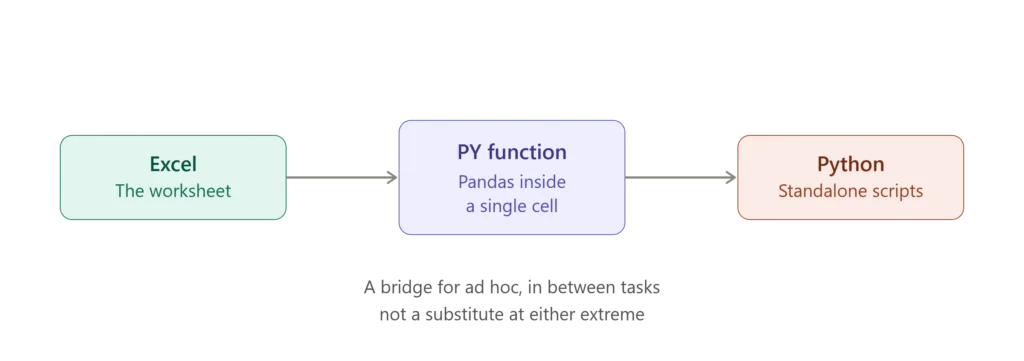
It does not replace standalone Python, though. The worksheet it runs in is still bound by Excel’s row limits and file size behavior, so genuinely large datasets still choke it the same way a normal formula would. Fully automated pipelines that run on a schedule without anyone opening Excel still belong outside the grid, in a standalone script. Think of PY as a bridge for the ad hoc, in between cases, not a substitute for either tool at the extremes.
If your team already lives in Excel and just needs occasional heavier lifting, this feature is worth exploring before you assume a full Python setup is the only option.
The Honest Decision Framework
Here is how I actually think about this when a client asks.
If the work is financial modeling, budget planning, forecasting, or analysis that one person or a small team needs to look at, edit, and trust on sight, it belongs in Excel. The visibility and the low barrier to entry are the point, not a limitation.
If the work is processing millions of rows, running the exact same transformation on a recurring schedule with no human in the loop, or doing statistical modeling that goes beyond what a spreadsheet formula can express, it belongs in Python.
The mistake I see most often is a business deciding they have outgrown Excel because a report feels slow or clunky, when the real problem is that the Excel file was never built properly in the first place. A workbook full of copy pasted formulas, broken references, and manual steps will feel like it has hit a wall well before Excel’s actual limits. Rebuilding that process in Python does not fix the underlying design problem, it just moves it into a language fewer people on the team can read or maintain.
There is a useful way to frame this that I come back to often. Python tends to be the stronger tool for the analysis itself, and Excel tends to be the stronger tool for communicating the result. A finance director does not want a script or a notebook. They want a spreadsheet they can open, click into, and trust on sight. Whatever tool does the heavy lifting behind the scenes, the output most people in a business actually need to see still lands in Excel.
The opposite mistake happens too. A business hires a developer to build a Python pipeline for a process that a properly structured Excel workbook with Power Query and a few VBA macros could have handled for a fraction of the cost, with the added benefit that the person running it can actually see what it is doing.
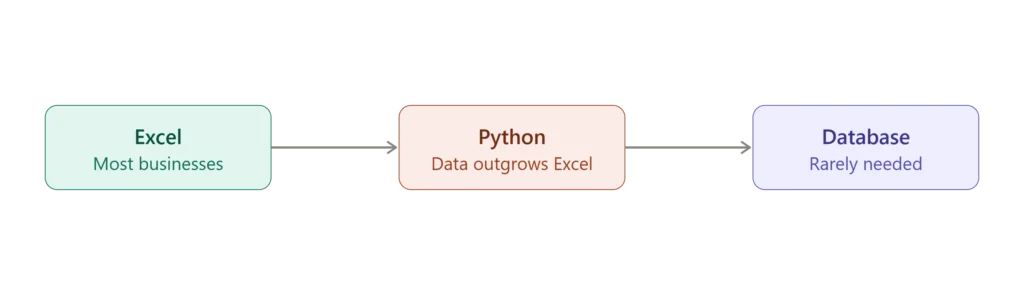
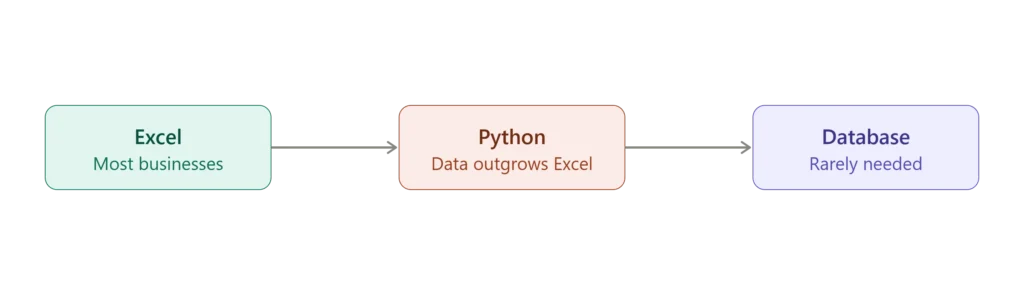
There is also a natural progression worth knowing about, even if most businesses never need to go past the first step. Spreadsheets handle the data until the volume or the complexity outgrows them, at which point Python and pandas take over. If the data keeps growing past what a single machine can hold in memory, the next step is a proper database. Very few small and mid-sized businesses ever need to think about that third stage, but it explains why some consultants push Python earlier than a business actually needs it. Knowing where your business actually sits on that path is more useful than assuming you need to skip straight to the end.
The Real Cost Difference
The sticker price comparison is misleading if you stop at software licensing. Excel comes bundled into a Microsoft 365 subscription most businesses already pay for. Python itself is free and open source, so on paper it looks cheaper.
The real cost is people, not licenses. Excel skills are common enough that you rarely pay a premium to find someone who can build or maintain a workbook. Python work usually means hiring a developer or data analyst, either on staff or through a consultant, and that person needs to be paid whether the script runs once a year or every day. If the person who wrote the original script leaves the business, whoever inherits it has to read code they did not write before they can safely change it. An Excel workbook, even a messy one, rarely creates that same handoff problem, because the logic sits visibly in the cells rather than hidden in a file most of the team cannot open and read.
None of that means Python is a bad investment. For a business processing genuinely large volumes of data or running the same pipeline every week, the ongoing cost of a script that runs itself is usually far lower than the hours a team would otherwise spend doing the same work by hand in Excel. The point is to weigh the ongoing cost of the person maintaining the solution, not just the cost of the software itself, before deciding which way to go.
Can You Use Both
Yes, and for businesses working with genuinely large or messy data, this is often the practical answer.
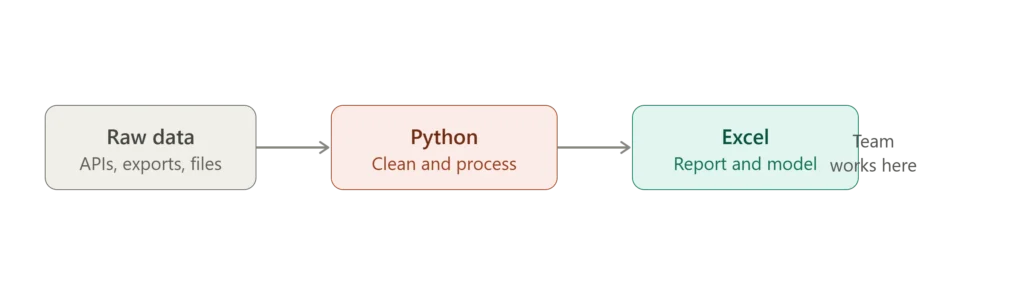
A common setup looks like this. Python handles the heavy lifting, pulling data from multiple sources, cleaning it, and running any calculations that need serious processing power. The cleaned result then lands in Excel, where the finance or operations team builds the models, reports, and dashboards they actually work from day to day. Python does the part Excel cannot do well. Excel does the part everyone on the team needs to see, trust, and adjust without calling a developer.
Pandas can read from and write to Excel files directly, which makes this handoff simple to set up once. The business gets Python’s processing power on the data side and Excel’s accessibility on the reporting side, without forcing either tool to do a job it was not built for.
One honest caveat worth knowing. Getting a polished, well formatted Excel file out of Python is not always as simple as it sounds. Dumping a pandas table into a spreadsheet is easy, but matching the formatting, layout, and polish a finance team expects usually takes extra work, either through a formatting library or by having Python populate a template that was already built properly in Excel. The cleanest setups I have seen use Python purely for the data preparation and let a well built Excel template, complete with formulas and formatting already in place, handle how the final result actually looks.
Where Excel Consulting Fits In
Most of the businesses that come to me asking about Python are not actually short on processing power. They are dealing with a manual, error prone Excel process that has grown past what anyone originally designed it to handle, and Python sounds like the obvious upgrade because it sounds more serious.
In practice, the fix is usually simpler than a rewrite in a new language. A workbook rebuilt with proper table structure, Power Query pulling and cleaning the data automatically, and a VBA macro handling the repetitive steps will often solve the exact problem that pushed someone toward Python in the first place, without adding a dependency on a developer to maintain code the rest of the team cannot read.
Python earns its place when the data volume or the task genuinely calls for it, millions of rows, a recurring pipeline touching systems outside Excel, or real statistical modeling. Short of that, a properly built Excel system usually gets a business further, faster, and at a lower ongoing cost.
At JAAD Group, I help businesses figure out which side of that line they are actually on before recommending anything. Sometimes that means building the Excel automation that removes the manual work causing the pain. Sometimes it means being straight with a client that their data has outgrown Excel and pointing them toward the right next step.
A free consultation starts with understanding what your process actually looks like today.