
If you have landed on this page, you are probably at a point where you know you need Excel help but you are not entirely sure what that help actually looks like or what it should cost. That is a completely reasonable place to be, and I want to give you a straight answer on both questions.
I have been doing this work for over 25 years. I have seen the full range of what Excel consulting actually involves, and I have also seen the full range of what businesses expect it to involve, which are not always the same thing. This article closes that gap.
What an Excel Consultant Actually Does
The short answer is that an Excel consultant solves Excel problems that your team cannot solve efficiently on their own. But that covers a wide range of work, and it helps to be specific.
At the most basic level, an Excel consultant fixes things. A broken formula. A macro that stopped working. A spreadsheet that produces results nobody trusts anymore. This is the reactive side of the work, and it is often what brings a new client in for the first time.
At the next level, an Excel consultant builds things. A financial model that your team can use for budgeting and forecasting. An automated reporting system that replaces hours of manual work every month. A VBA macro that takes a process your team currently does by hand and makes it run in seconds. This is where the real value of consulting work shows up, not in fixing what is broken but in building something that changes how your business operates.
Beyond that, an Excel consultant advises. Sometimes the right answer is not a more sophisticated spreadsheet but a better-structured one. Sometimes the right answer is pointing out that a process which seems like an Excel problem is actually a data structure problem, and fixing it at that level saves more time than any amount of automation built on top of it. A consultant with real experience knows the difference and tells you which is which before charging you to build the wrong thing.
Here is what the work looks like in practice across the most common types of engagements.
The Most Common Types of Excel Consulting Work
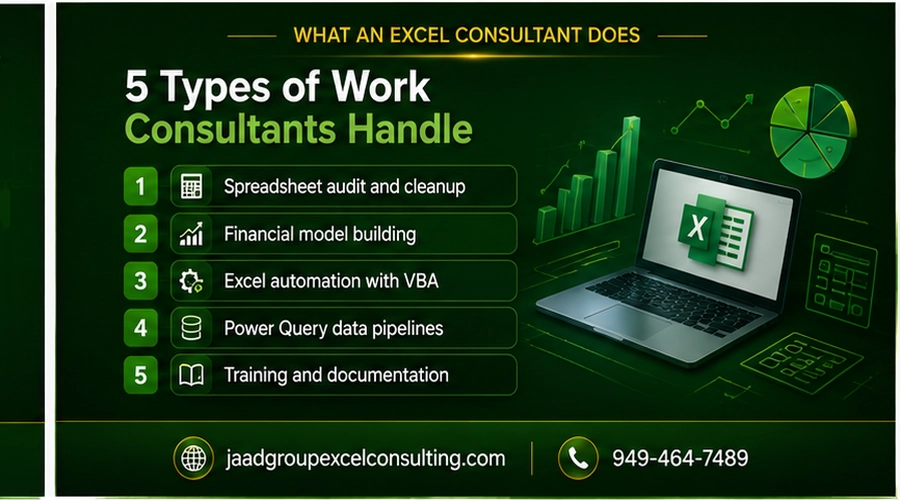
Spreadsheet audit and cleanup
This is often the starting point for businesses that have accumulated years of Excel files built by different people with different approaches. An audit involves reviewing your existing spreadsheets, identifying errors, fragile formulas, structural problems, and documentation gaps, and producing a clear picture of what works, what does not, and what needs to be rebuilt.
Financial model building
Building a 3-statement financial model, a budget vs. actual variance tracker, a cash flow forecast, or a scenario analysis tool. These are projects with a defined deliverable. You describe what you need the model to show and how your business works, and the consultant builds a model that does it accurately, is maintainable by your team, and is documented clearly enough that anyone can understand how it works.
Excel automation with VBA
This covers any situation where a process your team currently performs manually can be automated. A macro that consolidates data from multiple files. A one-click report generator that formats, calculates, and exports a PDF. A reconciliation tool that matches two datasets and flags exceptions automatically. VBA automation is where Excel consulting delivers the most dramatic time savings, and it is also the area that requires the most experience to do well.
Power Query data pipelines
Power Query connects Excel to external data sources, cleans and transforms data automatically, and refreshes the output with a click. For businesses that regularly import data from accounting systems, CRMs, databases, or CSV exports, a properly built Power Query connection eliminates the manual import and cleanup work that happens every reporting cycle.
Training and documentation
Some engagements focus not on building something new but on making sure your team can use and maintain what already exists. This includes training sessions on specific Excel functions, documentation of existing systems, and knowledge transfer when a key team member leaves and takes institutional knowledge with them.
How Much Does an Excel Consultant Charge?
This is where most articles either give you a number that is too wide to be useful or avoid the question entirely. I am going to be specific.
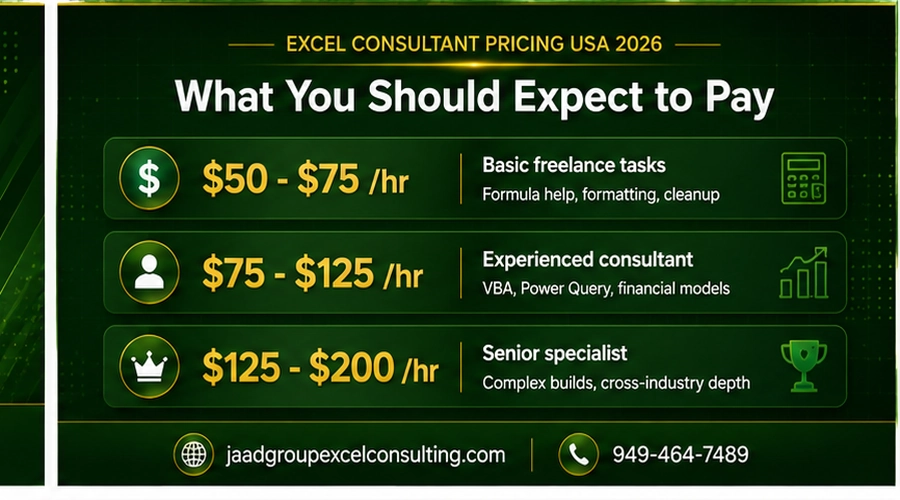
Hourly rates in the United States range from $50 to $200 per hour depending on the level of expertise and the type of work involved. Here is how that breaks down in practice.
At the lower end of the range, around $50 to $75 per hour, you are typically looking at generalist freelancers with solid Excel skills handling straightforward tasks like formula help, basic data cleanup, or simple formatting work. This tier is appropriate for one-off tasks where the stakes are low and the scope is well defined.
In the mid-range, around $75 to $125 per hour, you are looking at experienced consultants who can handle more complex work including VBA development, Power Query builds, and financial model construction. This is where most serious project-based Excel consulting sits.
At the upper end, $125 to $200 per hour, you are looking at consultants with deep specialization, extensive cross-industry experience, and a track record of building systems that hold up over time and under scrutiny. For work that carries real financial or operational stakes, this is the appropriate range.
Project-based pricing is common for defined deliverables. A straightforward automation project might run $1,000 to $3,000. A comprehensive financial model or multi-source reporting system typically runs $3,000 to $10,000 or more depending on complexity. Project pricing works well when the scope is clear and the deliverable is specific.
What you are actually paying for is not an hourly rate. It is the result of someone else’s learning curve applied directly to your problem. A consultant who has built the same type of system twenty times across different industries brings that accumulated experience to your project. That experience is what separates a solution that works once from a solution that works reliably for years.
What Separates a Good Excel Consultant from a Bad One
The gap between the best and worst Excel consulting work is significant, and it is not always obvious from a proposal or a portfolio. Here is what actually matters.
They look at your data before they propose a solution. Anyone who quotes you a price or timeline without seeing your actual source data, your current reports, and your existing setup is guessing. Good consulting starts with understanding the specific situation, not fitting your problem to a standard template.
They build things that other people can maintain. A solution that only the consultant understands is not a solution. It is a dependency. Every system I build comes with documentation that explains what it does, how it works, and what to do if something needs to change. Your team should be able to run it confidently without calling me every month.
They tell you when something is not worth building. If a simpler approach solves your problem just as well as a complex one, a good consultant tells you that. If the real issue is upstream of the Excel work, a good consultant says so rather than charging you to build automation on top of a broken process.
They have seen the specific type of problem you have. Messy exported data that does not follow a clean structure. Multi-entity consolidation across inconsistent chart of accounts. Financial models that need to hold up under audit. These are specific problems that require specific experience. General Excel proficiency is not the same as having built and debugged the same type of system across dozens of real business engagements.
Is an Excel Consultant Worth the Cost?
Here is the math stated simply.
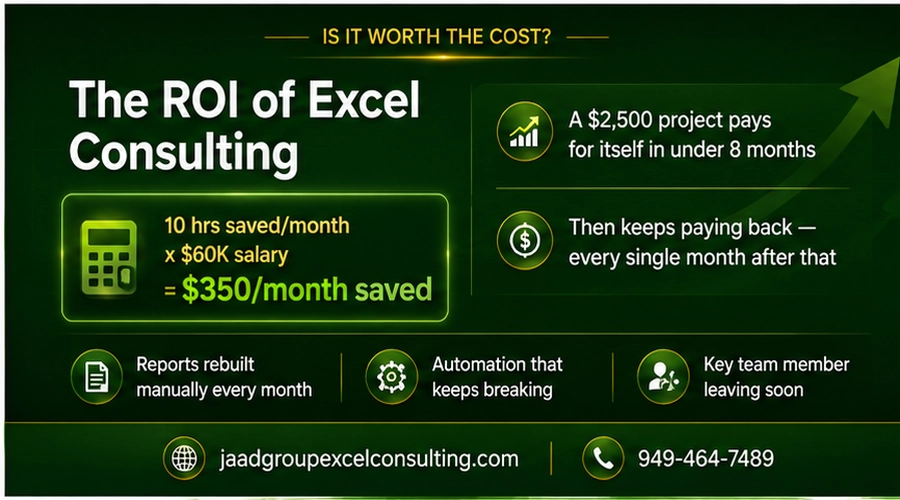
If an automation system saves your team 10 hours per month and those hours belong to someone earning $60,000 per year, the time savings are worth roughly $350 per month. A one-time project that costs $2,500 pays for itself in under eight months and keeps paying back every month indefinitely.
For financial models that support major business decisions, the calculation is different but the answer is the same. A model built correctly, with verified formulas, documented assumptions, and clear audit trails, is worth paying for. A model built incorrectly that produces wrong numbers and then influences a significant business decision is significantly more expensive than whatever the consulting engagement would have cost.
The businesses that treat Excel expertise as an expense to minimize are the ones still rebuilding the same report manually every month two years from now. The ones that treat it as a one-time investment in getting the right system built correctly are the ones with reliable processes that free up their team to focus on work that actually requires human judgment.
What to Expect When Working With JAAD Group
At JAAD Group, every engagement starts the same way. I look at what you actually have before recommending anything. Your current reports, your data sources, your existing setup. That is the only way to give you an honest assessment of what needs to be done and what it will cost.
Every project is handled personally by me. Not delegated to a junior team member. Not templated from a previous project. Built around how your specific business works, with documentation your team can use, and a direct line to me if anything needs to be adjusted after delivery.
If you are trying to figure out whether an engagement makes sense for your situation, a free consultation is the right starting point. We look at your current setup, I give you an honest answer on what it would take to fix it, and you decide from there.